Notes
Special Blocks
There are a handful of special blocks you can add to your notes.
To add these components, hold ctrl and left-click your note, you will be presented with a dropdown of specia blocks you can add.
Stopwatch
The stopwatch component allows you to time your work. You can start, pause and reset the time.
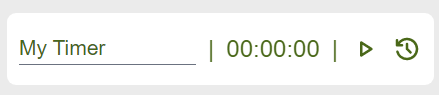
The first section is the editable name, so you can assign a name to your stopwatch.
The second section is the time, and the third is the controls.
Spoiler
The spoiler block allows you write text content and then click the block to blur the text out. Use this to keep sensitive information in your notes you don't want to be seen over your shoulder.
Whiteboard
The whiteboard provides a simple fix-sized box you can draw in.
The colour of the line in the whiteboard can be configured in the LNotes settings page.